Posts

Showing posts from February, 2026

Hide Headers, Commandbar, Tabs in D365 Forms

Image
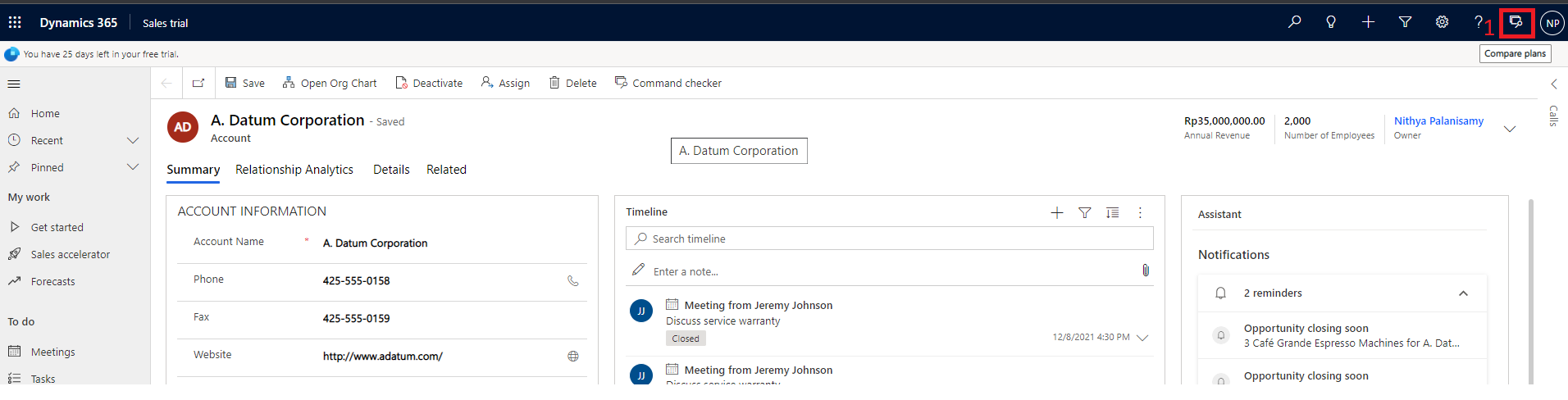
There are options available to hide Command Bar, Header part and Tabs.  Below is the screenshot which highlights these areas for your understandings. let formContext = Xrm.Page ; or let formContext = executionContext.getFormContext(); // Hide Header part formContext.ui.headerSection.setBodyVisible(false);   //Hide Command bar formContext.ui.headerSection.setCommandBarVisible(false);   // Hide Tabs formContext.ui.headerSection.setTabNavigatorVisible(false); After all are hidden,
Hide Headers, Commandbar, Tabs in D365 Forms

Image
There are options available to hide Command Bar, Header part and Tabs.  Below is the screenshot which highlights these areas for your understandings. let formContext = Xrm.Page ; or let formContext = executionContext.getFormContext(); // Hide Header part formContext.ui.headerSection.setBodyVisible(false);   //Hide Command bar formContext.ui.headerSection.setCommandBarVisible(false);   // Hide Tabs formContext.ui.headerSection.setTabNavigatorVisible(false); After all are hidden,

Popular posts from this blog

Ribbon debug/Command checker tool

Show/Hide ribbon button based on the selected view in the D365 subgrid

Using Resx file in D365 Plugins/Workflows