Posts

Showing posts with the label D365 filter lookups

Hide Headers, Commandbar, Tabs in D365 Forms

Image
There are options available to hide Command Bar, Header part and Tabs.  Below is the screenshot which highlights these areas for your understandings. let formContext = Xrm.Page ; or let formContext = executionContext.getFormContext(); // Hide Header part formContext.ui.headerSection.setBodyVisible(false);   //Hide Command bar formContext.ui.headerSection.setCommandBarVisible(false);   // Hide Tabs formContext.ui.headerSection.setTabNavigatorVisible(false); After all are hidden,
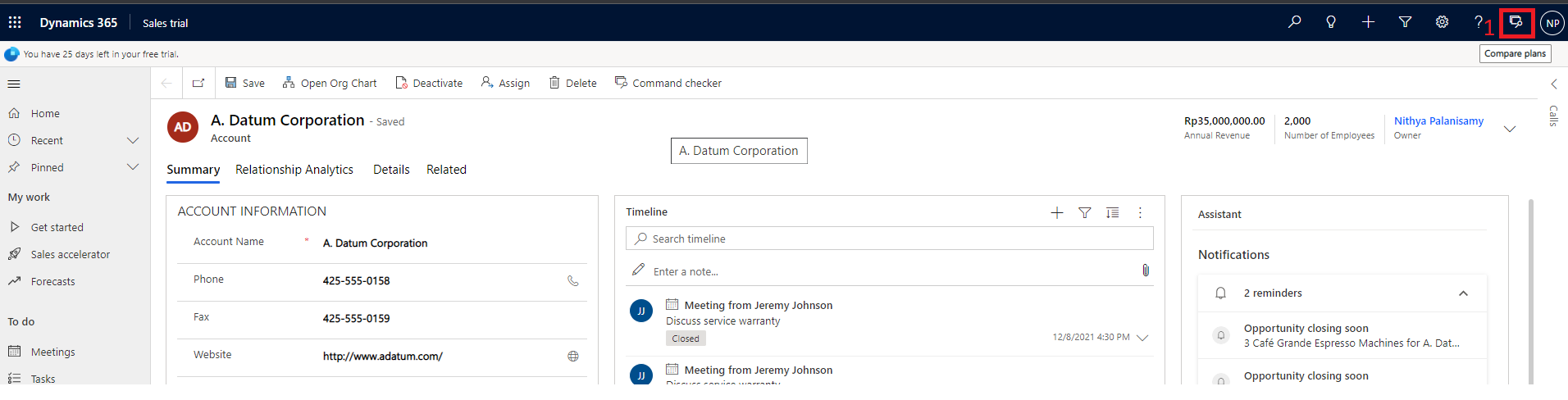
Update lookup Views/filters dynamically using D365 JS

Requirement: We had a requirement recently where we need to update the Product field's Lookup View dynamically based on the other fields, lets say Brand and Type.  If Brand has a value then Product lookup should be set with new custom view and if Brand is cleared then "All products" view should be shown with the added filter condition for Type. Solution: Create the following two functions to add in the 'addpresearch' event of Product lookup. 1. If Brand has a value, create a new function named 'filterProductBasedonBrand' and set the custom view  for Product lookup. Example:  function filterProductBasedOnBrand(executionContext) { //Get Form context var formContext = executionContext.getFormContext(); //Get Brand. var brand = formContext.getAttribute("brand").getValue(); //If Brand has value, set the custom lookup view to product lookup. if (brand !== null) { //Get Brand Id. brand = productBrand[0]....

Popular posts from this blog

Ribbon debug/Command checker tool

Show/Hide ribbon button based on the selected view in the D365 subgrid

Using Resx file in D365 Plugins/Workflows