Posts

Showing posts with the label Make sync calls in JS

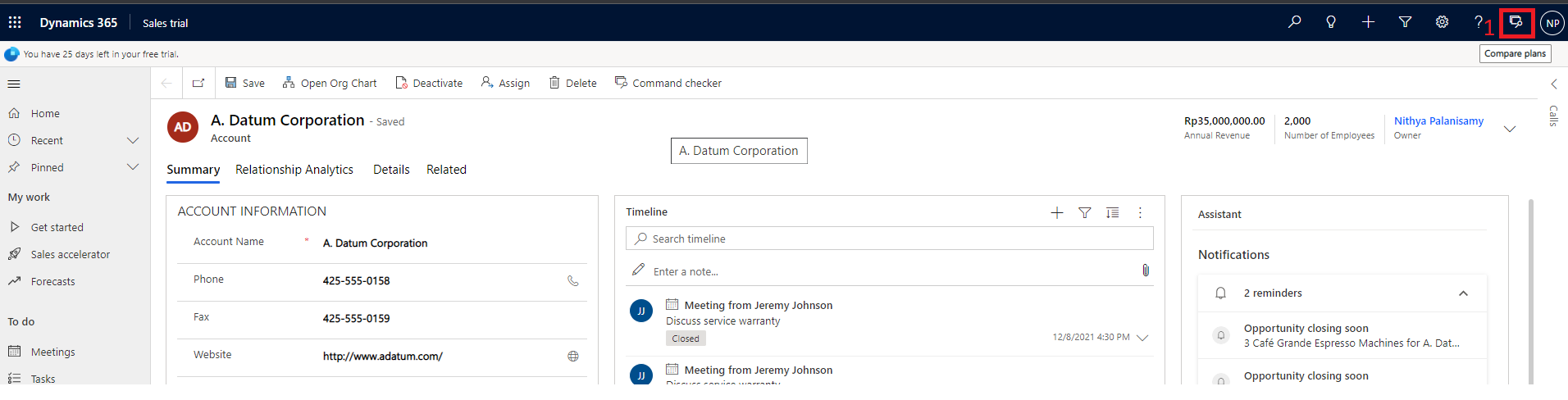
Hide Headers, Commandbar, Tabs in D365 Forms

Image
There are options available to hide Command Bar, Header part and Tabs.  Below is the screenshot which highlights these areas for your understandings. let formContext = Xrm.Page ; or let formContext = executionContext.getFormContext(); // Hide Header part formContext.ui.headerSection.setBodyVisible(false);   //Hide Command bar formContext.ui.headerSection.setCommandBarVisible(false);   // Hide Tabs formContext.ui.headerSection.setTabNavigatorVisible(false); After all are hidden,
Run async calls sequentially in D365 JS

With the introduction of "Xrm.WebApi.online", calls to CRM api becomes asynchronous always. Due to this, most of the times, we need to use ".then()" function and write the logic which needs to be executed next, or we are going with "XMLHttpRequest" for making synchronous calls.  Now, using  'async and await' keywords, we can make the code to run in a synchronous way with  "Xrm.WebApi.online" as well. Example: Consider the following requirement. In Contact home page, show or hide the 'Summary' ribbon button based on the view selected. the view name is stored in the custom entity 'Configuration Settings' which has two fields: Name and Value. There is already a method implemented to retrieve the  Configuration Settings Value based on the Name passed using  Xrm.WebApi.online. retrieveMultipleRecords . function GetConfigSettings(viewName) { try { var result = Xrm.WebApi.online.retrieveMultipleRecords("new_conf...

Popular posts from this blog

Ribbon debug/Command checker tool

Show/Hide ribbon button based on the selected view in the D365 subgrid

Using Resx file in D365 Plugins/Workflows